6. Azure Workshop
We will learn how to configure the Azure provider and provision resources in a subscription.
Solution Architecture
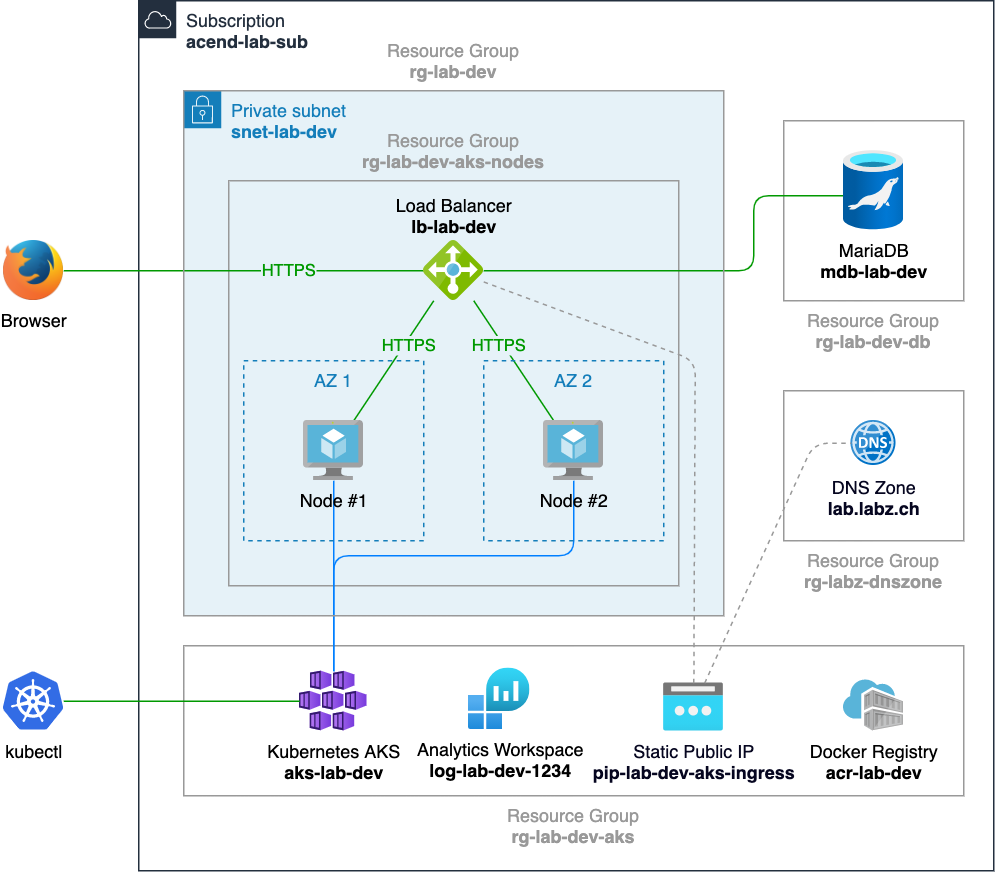
Goal: Deploy a HTTPS application on Kubernetes which writes to a database
Main components:
- Kubernetes Cluster (AKS, Azure Kubernetes Service)
- Log Analytics Workspace
- Docker container registry (ACR)
- Virtual Network (Vnet) + Subnet
- Static IP + DNS A record
- Load balancer (Layer 4) + Kubernetes Ingress Controller (NGINX)
- SSL Cert Manager
- MySQL
Diagram
Preparation
Let’s start with the creation of a subfolder for all azure exercises:
mkdir $LAB_ROOT/azure
cd $LAB_ROOT/azure
If you don’t have az CLI installed yet, navgiate to https://docs.microsoft.com/en-us/cli/azure/install-azure-cli
and follow the instructions.
After installation, run
az login --use-device-code
and follow the console and web browser instructions.
The Azure naming convention and resource abbreviation can be found at https://docs.microsoft.com/en-us/azure/cloud-adoption-framework/ready/azure-best-practices/resource-abbreviations